![worldview_logo_header_small.png]](https://worldviewltd.com/hs-fs/hubfs/WorldView%20Files/Images/Logo/worldview_logo_header_small.png?height=50&name=worldview_logo_header_small.png)
Features
Improved Service Line Visibility During Mobile Uploads
When uploading documents through the mobile app, it could be difficult to identify the correct patient admission or episode because the service line was not clearly displayed.
What will change?
The admission and episode selection list will now display the associated line of business, making it easier to identify the correct patient record. The most recent admission will also appear at the top of the list, helping clinicians quickly attach documents to the appropriate episode.
Note: If you would like this feature enabled, please reach out to Worldview Support or your CSM
-1.jpg?width=404&height=419&name=shared%20image%20(1)-1.jpg)
Enhanced Form Status Visibility in Mobile App
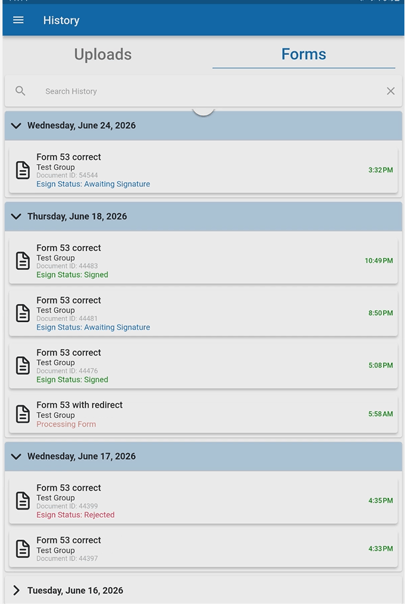
Users had limited visibility into the progress of forms submitted through the mobile app. This uncertainty sometimes led to duplicate submissions, especially for forms requiring multiple signatures.
What will change?
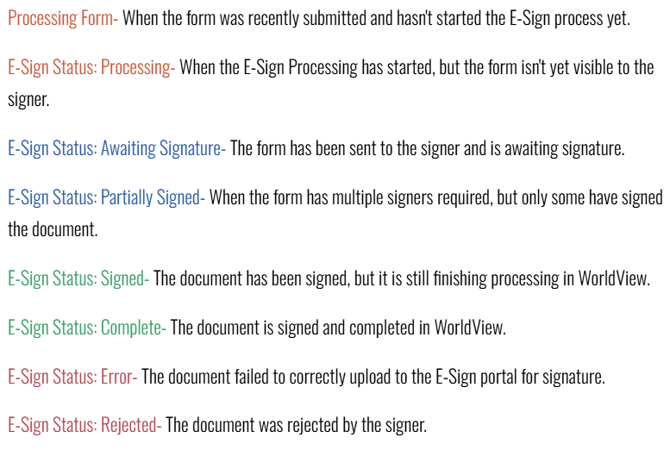
The mobile app will now display status indicators within form history, allowing users to easily track form progress. Statuses such as Awaiting Signature, Partially Signed, Completed, Returned, and Rejected will be clearly displayed, providing greater transparency throughout the signing process.
Bug Fixes
Improved Synchronization of User Email Updates
When a user's email address was updated in the Web or Unity Client, the change could result in duplicate user entries appearing within the mobile app, creating confusion and making user management more difficult.
What will change?
We've enhanced synchronization between systems to ensure email address updates are reflected correctly in the mobile app. User records will remain consistent, preventing duplicate entries and improving the overall user experience.
Improved User List Navigation in Mobile Messaging
When creating a new chat and viewing expanded groups, the user list could extend beyond the visible screen area, preventing access to some users.
What will change?
The user list now supports proper scrolling, ensuring all users remain accessible regardless of group size or screen dimensions.
Improved Bluetooth Keyboard Experience in Mobile Forms
When using a Bluetooth keyboard with mobile forms, cursor focus could remain on the navigation bar instead of moving directly to the selected form field, requiring additional keyboard navigation.
What will change?
We've improved keyboard focus behavior to provide a smoother experience when completing forms with a Bluetooth keyboard, reducing the need for additional navigation steps.
Improved Image Capture Workflow
In certain situations, retrying a captured image could cause the mobile app to unexpectedly close and return users to their device's home screen.
What will change?
We've resolved this issue to provide a more reliable image capture experience when retaking document photos within the mobile app.
Unread Message Indicators Now Clear Correctly
Unread message indicators could remain visible even after messages had been opened and read. Some users worked around this by sending a character to the conversation, creating unnecessary messages in the chat history.
What will change?
Unread message indicators will now clear automatically once messages have been viewed, providing a more accurate representation of unread conversations and eliminating the need for workarounds.