![worldview_logo_header_small.png]](https://worldviewltd.com/hs-fs/hubfs/WorldView%20Files/Images/Logo/worldview_logo_header_small.png?height=50&name=worldview_logo_header_small.png)
Features
Append Pages to Existing Documents in Outbox Queues
Previously, to add additional pages to a document in the Outbox Queues, users needed to modify the document externally and upload a new version.
What will change?
Users can now append additional pages directly from the Edit Document screen within the Outbox Queues. This streamlines the process of updating and extending documents without the need for external tools or re-uploading files.

Improved Highlighting on Grid
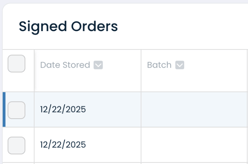
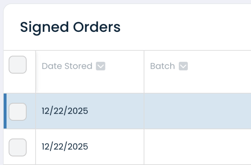
Previously, selected items in the Web Client were highlighted with a very light blue color, making it difficult to track selections when scrolling or refreshing.
What will change?
The highlight color has been updated to a darker blue, improving visibility and making it easier to quickly identify selected items.
Bug Fixes
Improved Handling for “Do Not Send” Expiration Settings
When applying the “Do Not Send” flag with an expiration date, users could encounter an error if the “Do Not Send Expiration” setting was not fully configured. In these cases, the flag was not applied as expected.
.png?width=363&height=187&name=Image%20(24).png)
What will change?
We’ve improved this experience by updating the error messaging and ensuring the system behaves as intended. If the expiration date setting is not configured, users will now see a clearer message and the “Do Not Send” flag will still be applied—defaulting to no expiration date.
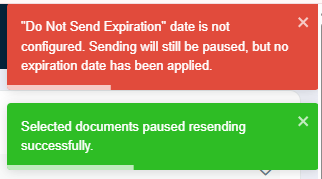
Please Note: If you encounter this error, please contact your CSM or WorldView Support to request a configuration update.
Attachment Errors When Using “Send to Fax” in the Inbox
Using the “Send to Fax” action in the Inbox could sometimes cause the attachment to fail when sending documents to the EMR. As a result, affected documents could remain stuck in the export queue after this action was taken.
What will change?
The “Send to Fax” action has been updated to prevent this issue. Users can now use the "Send to Fax" action in the Inbox without causing any attachment related issues.
Episode Visit Attachments - Allowing for Selecting Episode
When trying to attach documents to the episode visit level in the web client, users were not prompted to select the correct episode - instead it defaulted to the most recent episode and there was no option to pick a different episode. This limited the users to only be able to select visits from the defaulted episode and not other episodes for that patient.
What will change?
All relevant patient episodes—both current and prior—will now be available for selection when attaching documents at the episode visit level in the Web Client, aligning with expected system behavior.
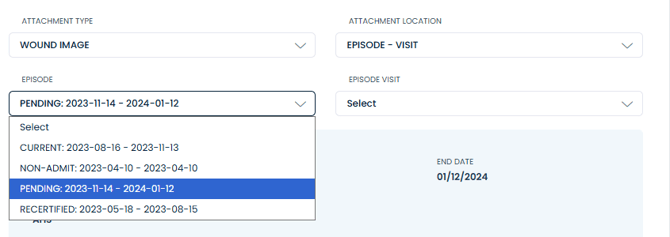
Note: Not all EMRs support attachments at the episode-visit level. If your agency does not use this attachment location, this update will not apply to your workflow.
Ensure “Send to Fax” from the Inbox Immediately Sends Documents
When using the “Send to Fax” action from the Signed Orders queue in the Inbox, a new document was generated that could inherit metadata—such as an order number—from the original item. This often caused the document to follow an unintended delivery method instead of being faxed immediately, resulting in delays or items getting routed to a different queue.
What will change?
The “Send to Fax” action from the Inbox will now immediately fax documents as expected.
Improved Navigation After Attaching Documents
Previously, after attaching a document in an Inbox queue, the next document was automatically selected but not visibly highlighted in the main document grid after collapsing the document viewer, making it difficult to tell which document was currently in use.
What will change?
After using the Attach to Chart action in the Inbox, the next document in the queue will now be automatically highlighted when in a collapsed view, allowing for a smoother and more efficient workflow.