![worldview_logo_header_small.png]](https://worldviewltd.com/hs-fs/hubfs/WorldView%20Files/Images/Logo/worldview_logo_header_small.png?height=50&name=worldview_logo_header_small.png)
Features
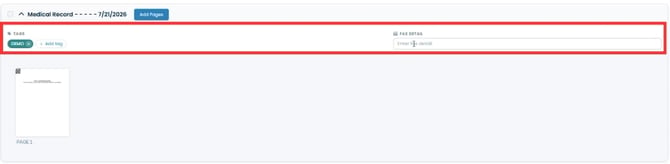
Add Labels While Splitting Documents
Previously, when splitting documents, labels and fax details had to be applied after the split was completed.
What will change
You can now assign or update document labels and retain/update or add fax details during the document split process, reducing the number of steps needed to organize your documents.
Manage Web Messaging Distribution Groups
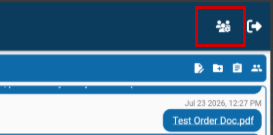
Previously, Distribution Groups for Web Messaging could not be managed directly within the Web Messaging platform.
What will change
Administrators can now create and edit Distribution Groups directly within the Web Messaging platform, making it easier to keep messaging groups organized and up to date.

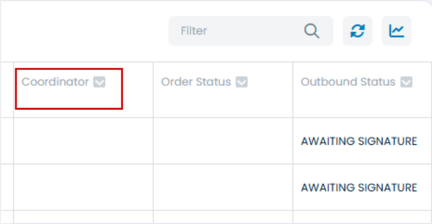
Admission Coordinator Now Automatically Updates from Homecare Homebase
Previously, displaying the Admission Coordinator with an order required your agency to manually maintain the physician directory in WorldView to keep this information up to date.
What will change
WorldView can now automatically receive the Admission Coordinator information directly from Homecare Homebase and display it with your orders. This eliminates the need to manually maintain the physician directory for this information.
Please Note: If you'd like to enable this feature, please contact Support or your Customer Success Manager for assistance with configuration.
Team Information Available in the Inbox
Previously, team information from Homecare Homebase was not available in the Web Client, making it more difficult to identify which team a patient or document belonged to.
What will change
WorldView can now receive Team information from Homecare Homebase and display it in the Inbox for recognized patient documents, such as physician orders and other patient-related documents. This makes it easier to organize and identify documents by team.

Please Note: If you'd like to enable this feature, please contact Support or your Customer Success Manager for assistance with configuration.
Bug Fixes
Improved Document Attachment Reliability
Previously, some customers experienced intermittent issues when attaching documents, which could occasionally cause documents to fail during the attachment process.
What will change
We've improved how Episode IDs are applied during document attachment, reducing intermittent attachment errors and providing a more reliable, streamlined attachment experience for users.
Faster Viewing for Large PDF Documents
Previously, large PDF documents could take longer to load, and in some cases users experienced display issues while viewing them.
What will change
We've improved document viewing performance to provide faster load times, smoother zooming, and a more reliable viewing experience for large PDF files.
Improved Multiple Form Submission Experience
Previously, after submitting a form in the Web Client, users had to refresh their browser session before they could successfully submit another form.
What will change
You can now submit multiple forms during the same session without refreshing the page. The form will now open in a new window. While there may still be occasional prompts to reload a form during the process, this update removes the need to restart your session and makes completing multiple forms much more efficient.