![worldview_logo_header_small.png]](https://worldviewltd.com/hs-fs/hubfs/WorldView%20Files/Images/Logo/worldview_logo_header_small.png?height=50&name=worldview_logo_header_small.png)
Features
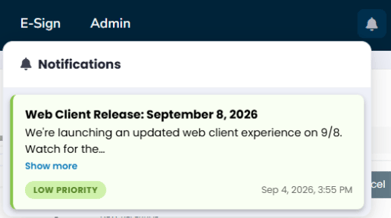
Web Client Notifications and Banners
Previously, important updates or information were not prominently displayed within the Web Client, making it possible for users to miss time-sensitive messages.
What will change:
The Web Client will now display banners for important information and updates when they arise. These notifications will be displayed so users can easily see and acknowledge important messages while working in the Web Client.

Alphabetized Tags
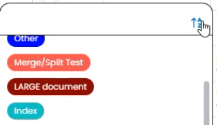
Previously, tags in the Web Client were not consistently displayed in alphabetical order, making it more difficult to quickly find the tag you needed.
What will change
You will now be able to sort tags in alphabetical order, making them easier to locate and select.
Direct Uploads to E-Sign Tracking
Previously, to use WorldView’s E-Sign for Patient Forms, the form had to be started in WorldView through the mobile application or Web Client.
What will change:
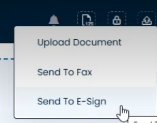
Forms created outside of WorldView can now be uploaded to WorldView through the Web Client and tracked until they are signed by the patient or caregiver..
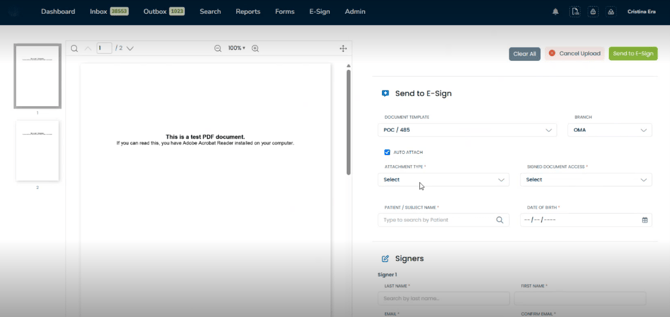
Please Note: Additional configuration may be necessary to utilize this feature. Please contact Support or your Customer Success Manager with any questions.
Web Client Notifications for Queue Activity
Previously, users could move documents between queues in the Web Client, but there was no notification to alert the appropriate users when documents were moved into queues requiring their attention.
What will change:
Web Client users can now receive notifications when documents are moved into configured queues, including RN Review, Intake, and Escalations. This helps users stay aware of documents that have been routed to their queue and may require action.
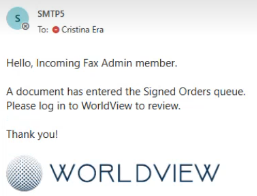
Outdated Signed Order Detection
Previously, when a signed fax was returned and processed, WorldView had no way to detect if it corresponded to an older version of the order. If an order was revised in your EMR after it was already sent out for signature, the older signed copy could still be processed and attached to the patient chart — creating a risk of filing an outdated or superseded document.
What will change:
WorldView now tracks revision numbers on orders sent for signature. When a signed fax is received, the system automatically compares its revision against the current version of the order on file. If the incoming signed copy is not the most recent revision, it will be flagged as an "Outdated Order" with a note for the agency to review prior to processing.

Cancel Active Searches
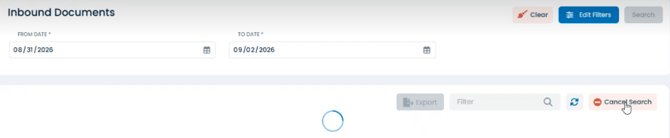
Previously, when searching for documents in the Web Client, users could not cancel a search once it was in progress. For larger searches, users had to wait for the search to finish before starting another action.
What will change:
Users can now cancel an active search within the Search and Reports area of WorldView, giving them more control over searches and allowing them to stop a search that is no longer needed.
Bug Fixes
Improved Validation for Signature Dates
Previously, validation rules for signature dates were removed for many customers due to an issue that could cause errors during processing. As a result, an invalid signature date could go unnoticed until the document reached an error queue.
What will change:
Signature date validation has been improved so invalid dates can be identified while the document is being processed. Users can now receive an alert when an invalid signature date is entered, allowing the date to be corrected before the document continues through the workflow.
Date of Birth Display Issues
Previously, in some situations, birth dates displayed in the Web Client could appear differently depending on where the date was viewed. This could result in mismatched dates being displayed when reviewing document or patient information.
What will change
Date formatting has been corrected in the Web Client so dates display consistently throughout the applicable workflow and review screens.
Restored Markup Functionality for Processed Orders
Previously, some orders created during document processing could not be used with the Markup functionality in the Unity Client.
What will change: PDFs created during processing will now be properly converted to the format needed for Markup, allowing users to add Markup to these documents as expected in the Unity Client.